
AgDLR 0.5

agdlr-400

I mentioned yesterday that it looked like a new release of AgDLR was eminent and sure enough here it is. There are some really cool new features including Silverlight 3 Transparent Platform Extension support, In-Browser REPL and In-Browser testing of Silverlight apps. As with IronRuby 0.3, Jimmy has the a summary of the new AgDLR release.

One feature of the new release I did want to highlight was XapHttpHandler because I’m the one who wrote it! 😄

The Silverlight versions of IronPython and IronRuby ship with a tool called Chiron that provides a REPL-esque experience for building dynamic language Silverlight apps. John Lam had a good write-up on Chiron when we first released it last year, but basically the idea is that Chiron is a local web server that will auto-generate a Silverlight XAP from a directory of Python and/or Ruby files on demand. For example, if your HTML page requests a Silverlight app named app.xap, Chiron automatically creates the app.xap file from the files in the app directory. This lets you simply edit your Python and/or Ruby files directly then refresh your browser to get the new version without needing an explicit build step.

The problem is that, unlike IIS and the ASP.NET Development Server, Chiron doesn’t integrate with ASP.NET. So it’s fine for building Silverlight apps that stand alone or talk to 3rd party services. But if you want to build a Silverlight app that talks back to it’s ASP.NET host, you’re out of luck. That’s where XapHttpHandler comes in. XapHttpHandler does the same exact on-demand XAP packaging for dynamic language Silverlight applications that Chiron does, but it’s implemented as an IHttpHandler so it plugs into the standard ASP.NET pipeline. All you have to do is put the Chiron.exe in your web application’s bin directory and add XapHttpHandler to your web.config like so:

<configuration>
  <!--remaining web.config content ommitted for clarity-->
  <system.web>
    <httpHandlers>
      <add verb="*" path="*.xap" validate="false"
           type="Chiron.XapHttpHandler,Chiron"/>
    </httpHandlers>
  <system.web>
</configuration>

The new AgDLR drop includes a sample website that shows XapHttpHandler in action.

Quick note of caution: by design, XapHttpHandler does not cache the XAP file – it’s generated anew on every request. So I would highly recommend against using XapHttpHandler on a production web server. You’re much better off using Chiron to build a physical XAP file that you then deploy to your production web server.

IronRuby 0.3

Last week was Mix09, Microsoft’s annual conference for web development and design. There were some big announcements – Silverlight 3 Beta, ASP.NET MVC RTM, TDS support for SQL Data Services, new drops of Azure and LiveFX SDKs and I’m sure a bunch of other things that I’ve forgotten.

Of course, by far the most important thing that shipped at Mix09 was IronRuby 0.3.

Jimmy has the details on the new release and John Lam did a talk at Mix on dynamic languages in Silverlight. I haven’t seen an announcement, but it also looks like there’s a new version of AgDLR – aka the Silverlight Dynamic Languages SDK – as well.

Writing an IronPython Debugger: A Little Hack…err…Cleanup

Yesterday, I pushed out two commits to ipydbg. The first was simple, I removed all of the embedded ConsoleColorMgr code in favor of the separate consolecolor.py module I blogged about Thursday. The second commit…well, let’s just say it’s not quite so simple.

Last weekend, I was experimenting with breakpoints when I discovered that the MoveNext method of BreakpointEnumerator was throwing a NotImplementedException. Up to that point, I hadn’t modified any of the MDbg C# source code except to merge the corapi and raw assemblies into a single assembly. But since I had to fix BreakpointEnumerator, I figured I should make some improvements to the C# code as well. For example, I added helper functions to easily retrieve the metadata for a class or function.

In my latest commit, I’ve added a SymbolReader property to CorModule. Previously, I managed the mapping from CorModules to SymbolReaders in my IPyDebugProcess class via the symbol_readers field. However, since mapping CorModules to SymbolReaders is something pretty much any debugger app would have to do, it made more sense to have that be a part of CorModule directly. So now, you can set and retrieve the SymbolReader directly on the module. Furthermore, I moved the logic to retrieve a SymbolReader from the IStream provided in the OnUpdateModuleSymbols event into the CorModule class as well.

I wouldn’t have bothered to blog this change at all, except that if you look at how the SymbolReader property is implemented under the hood, it’s not what you would expect. Instead of having SymbolReader as an instance variable on CorModule – as you might expect -CorModule has a static dictionary mapping CorModules to SymbolReaders. The instance SymbolReader property simply then access to the underlying static dictionary.

//code taken from CorModule class in CorModule.cs
private static Dictionary<CorModule, ISymbolReader> _symbolsMap = 
    new Dictionary<CorModule, ISymbolReader>();

public ISymbolReader SymbolReader
{
    get
    {
        if (_symbolsMap.ContainsKey(this))
            return _symbolsMap[this];
        else
            return null;
    }
    set
    {
        _symbolsMap[this] = value;
    }
}

Now obviously, this the way you typically implement properties. However, the problem is that there isn’t a 1-to-1 mapping between the underlying debugger COM object instances and the managed objects instances that wrap them. For example, if you look at the CorClass:Module property, it constructs a new managed wrapper for the COM interface it gets back from ICorDebugClass.GetModule. That means that I can’t store the symbol reader as an instance field in the managed wrapper since I probably will never see a given managed wrapper module instance ever again.

All of the debugger API wrapper classes including CorModule inherit from a class named WrapperBase which overrides Equals and GetHashCode. The overridden implementations defer to the wrapped COM interface, which means that two separate managed wrapper instances of the same COM interface will have the same hash code and will evaluate as equal. The upshot is that object uniqueness is determined by the wrapped COM object rather that the managed object instance itself.

Using a static dictionary to store a module instance property provides the necessary “it doesn’t matter what managed object instance you use as long as they all wrap the same COM object underneath” semantics. If I create multiple instances CorModule that all wrap the same underlying COM interface pointer, they’ll all share the same SymbolReader instance from the dictionary.

Yeah, it’s feels kinda hacky, but it works.

IronPython ConsoleColorMgr

I really liked the ConsoleColorMgr class from my last ipydbg post so I took a few minutes to yank it out into its own seperate module. I also took the opportunity to make a few improvements.

First off, I added support for background colors as well as foreground colors. Furthermore, both colors default to “None” which ConsoleColorMgr takes to mean leave that color unchanged.

from System import Console as _Console

class ConsoleColorMgr(object):
  def __init__(self, foreground = None, background = None):
    self.foreground = foreground
    self.background = background

  def __enter__(self):
    self._tempFG = _Console.ForegroundColor
    self._tempBG = _Console.BackgroundColor  
    if self.foreground: _Console.ForegroundColor = self.foreground
    if self.background: _Console.BackgroundColor = self.background

  def __exit__(self, t, v, tr):
    _Console.ForegroundColor = self._tempFG  
    _Console.BackgroundColor = self._tempBG

The other change I made was to build a set of default ConsoleColorMgr instances in the consolecolor module, one for each of the values in ConsoleColor.

import sys
from System import ConsoleColor, Enum

_curmodule = sys.modules[__name__]

for n in Enum.GetNames(ConsoleColor):
    setattr(_curmodule, n, ConsoleColorMgr(Enum.Parse(ConsoleColor, n)))

Note that for this set of default ConsoleColorMgr instances, I’m only setting the foreground color. If you want to set the background color, you have to create your own ConsoleColorMgr instances. This allows me to write the following:

from __future__ import with_statement
import consolecolor

with consolecolor.Red:
    print "Open the pod bay doors, HAL"
with consolecolor.ConsoleColorMgr(ConsoleColor.Black, ConsoleColor.Red):  
    print "I'm sorry Dave, I'm afraid I can't do that."

If you want it, I’ve put consolecolor.py up on my skydrive or it’s available as part of my devhawk_ipy project on GitHub.

Update: Christopher Bermingham pointed out that my sample snippet at the end doesn’t work unless you add from future import with_statement to the top of your python file. I updated my code snippet to include this. Thanks Christopher!

Writing an IronPython Debugger: Colorful Console

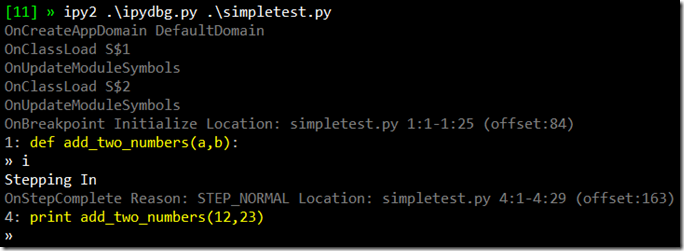
Now that I’ve added the current source code line to the console output, I wanted to start using color in order to make it clearer to understand the various pieces of data that gets output. Now, the various event handler messages get output in dark grey while the current line of source is in yellow. Here’s what it looks like on my machine (note, the top line with the green [11] is PowerShell and ipy2 is a PowerShell alias to ipy.exe v2.0.1)

ipydbg on the console

Writing color to the windows console is a hassle because of the stateful API it uses. The problem is that I always want to return to the default color after I’ve written out a line of colored text. I wish there was an overload of Console.Write and WriteLine that took the foreground and background colors as arguments.

Of course, I could easily implement my own write and writeline methods that took color parameters. However, I was loath to do that as Python’s print statement is so convenient. So instead, I build a console color context manager. I got the idea from Luis Fallas’ XmlWriter context manager.

class ConsoleColorMgr(object):  
  def __init__(self, color):  
    self.color = color  

  def __enter__(self):  
    self.temp = Console.ForegroundColor  
    Console.ForegroundColor = self.color  

  def __exit__(self, t, v, tr):  
    Console.ForegroundColor = self.temp  

CCDarkGray = ConsoleColorMgr(ConsoleColor.DarkGray)
CCGray     = ConsoleColorMgr(ConsoleColor.Gray)
CCYellow   = ConsoleColorMgr(ConsoleColor.Yellow)

def OnCreateAppDomain(self, sender,e):  
    with CCDarkGray:  
      print "OnCreateAppDomain", e.AppDomain.Name  
    e.AppDomain.Attach()

Python’s with statement is similar to C#’s using statement. However, unlike IDisposable object, Python context managers support both an enter and exit method. This means I don’t have to construct an object in order to get a context (in this case, the console colors) managed. So far, I’ve got three console color context managers defined – Grey, DarkGrey and Yellow. I’m thinking that ConsoleColorMgr is a candidate for my assorted module collection at some point.

Now that I can print in color, I wanted to modify my line printer to use color. Usually, the current sequence point corresponds to an entire line of python source. But as we see below, sometimes only part of a given line of source text is associated with a given sequence point.

The other issue I ran into is that there’s a always a sequence point at the very end of a function. Unlike the break at the start of the function I wrote about in my last post, this one I didn’t want to automatically step over. This is the last breakpoint for a given scope, so I should give the user one last chance to inspect the scope (once I add the ability to do that, at any rate) before we step out of it. However, I wanted a way of showing that we’re about to step out in the source code line view. I decided on writing a series of carets ^^^ to indicate that we’re at the end of a function.

As you can see in the dark grey line in the screenshot above, the current sequence point starts and ends at line 4 column 23. Column 23 is beyond the end of line 4, so that’s what I look for in order to draw the three carets. Here’s the final version of _print_source_line:

def _print_source_line(self, sp, lines):
  line = lines[sp.start_line-1]
  with CCGray:
    Console.Write("%d: " % sp.start_line)
    Console.Write(line.Substring(0, sp.start_col-1))
    with CCYellow:
      if sp.start_col > len(line):
        Console.Write(" ^^^")
      else:
        Console.Write(line.Substring(sp.start_col-1,
                                     sp.end_col - sp.start_col))
    Console.WriteLine(line.Substring(sp.end_col-1))

So colorizing the current line of source code turned out to be a little harder than I had expected. But hey, I got a start of a reusable module out of it. That’s pretty cool. Anyway, the latest bits are, as always, up on GitHub.
