Enterprise WinRT Apps Build Roundup

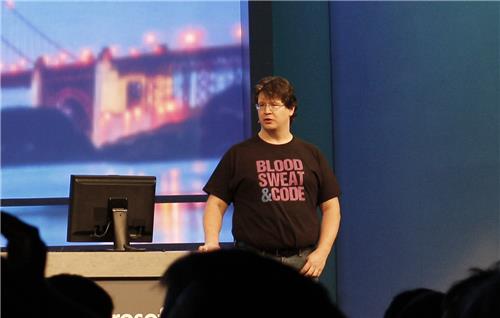
Wow, it’s been a whirlwind couple of days down here in San Francisco @ Build 2014. It has certainly been a huge thrill for me, getting a chance to be a part of the day one keynote and getting 15 minutes of fame. However, as the conference winds down I wanted to pull together a summary of the stuff Microsoft announced that relates to enterprise app development and Windows 8.1 Update. I mean, it wasn’t all about my wardrobe choices…

The Windows for Business blog as a good summary post that hits the highlights. The stuff I wanted to specifically call out is:

  • We’ve changed the policy to allow side loaded apps to communicate with desktop apps. Literally every single enterprise customer, Microsoft dev consultant and enterprise technical sales rep I’ve spoken to in the last year has asked for this.
  • We’ve added a feature in Windows 8.1 Update to enable side loaded apps to run code outside of the App Container. This opens up side loaded apps to access the full power of Windows as well as all the existing code the enterprise may have in its portfolio
  • We’ve made it significantly easier to get side load rights. I’d go thru the specifics here, but Rocky Lhotka (who has been very vocal about the issues in this space) had a great summary: “For a maximum of around $100 virtually every organization (small to huge) can get a side loading unlock key for all their devices.”

If you want more information on how to take advantage of these new features for side loaded apps, here are some resources for you:

  • In addition to my 5 minutes in the keynote, I did a whole session where I drilled into more details on that demo. I also demos that used network loopback for interprocess communication.
  • John Vintzel and Cliff Strom had a session on deploying enterprise apps. As of this writing, the video isn’t online yet but it will be within a day or two at that URL.
  • We have published whitepapers on both Brokered WinRT Components and using network loopback in WinRT apps that go into more details on how to build solutions with this technology
  • Last but not least, we have a set of samples of sideloaded WinRT apps. This includes the keynote demo, another brokered component demo and the WCF & ASP.NET network loopback demos I did in my session. Note, the keynote demo sample is packaged oddly because of the way MSDN’s sample repo handles (or in this case doesn’t handle) VS solutions with multiple projects. When I get back to Redmond, I’m  going to see if there’s a better way to get this sample hosted.

I heard many times over the past two days from folks in person at the conference and via email, twitter, facebook, carrier pigeon, etc just how excited they are about these changes & features. As an engineer who spends most of his days in his office and or in meetings building this stuff, it is amazingly gratifying to hear directly from our users how much our work can help them.

Blood Sweat & Code

CNN

Today was a *HUGE* thrill as I got to present in the keynote at //build! I’ll have more on the specifics of Brokered WinRT Components later after my session, but apparently quite a big deal was made of my shirt. I ended up as an internet meme and on the CNN Live Blog!

A long, long time ago (back when I wrote Photoshop Plugins for Mac long before I joined Microsoft), I had a Metrowerks CodeWarrior t-shirt with the “Blood Sweat & Code” slogan on the back. I loved that slogan, but lost the shirt somewhere along the way. So a few months ago, I decided to make a new one – but this time with the purple and blue of Visual Studio’s brand instead of CodeWarrior yellow. When I got a chance to be a part of the //build keynote today, I figured it was a good wardrobe choice.

For those who want one of their own, I posted the design on Zazzle.

Putting the “Dev” Back in DevHawk

I’ve done a lot of different jobs in my 15+ years at Microsoft. All of them have been development related in one way or another. Development consulting, developer evangelism, architecture evangelism, IT architect, etc. For the past six years, I’ve been a program manager for a developer related technology – first for IronPython and later for Windows Runtime.

It’s been a good run, but I’m taking the opportunity to move from a “development related” job to just being a pure developer.

I can’t talk much the new gig, other than to say I am working with an all-star cast of braniacs including the likes of Joe Duffy, Stephen Toub, Adam Nathan and Krzysztof Cwalina. Just the knowledge osmosis opportunity alone is enough to make my head spin. Luckily, after four years on the Windows Runtime team, I’m already quite used to working around a bunch of braniacs – though arguably a less well known in the community bunch once you get beyond than the unestimable Larry Osterman.

As for this blog, I hope to be blogging more in the future. No promises, but certainly I can’t blog much less than I have for the past several years (zero posts for all of 2013 is kind of depressing). In particular, I’ve been away from production development for many, many, many years so I figure there is lots of interesting topics to focus on as I make this transition. In particular, I don’t have a classic “algorithms and data structures” computer science background. Based on the interview questions I got – all related to linked lists and binary search trees – I’m guessing this is an area where I really need to sharpen the saw.

Hope you all have liked the various technology I’ve worked on so far. Here’s hoping you like what comes next even more.

Windows Camp Demo, Part Two

In my previous post, we set up a C++ WinRT component project and a C# Metro style XAML app to use the component. The code was dinky Hello, world type stuff. Now, let’s do something a little more interesting.

In preparing for this demo, I found a C++ bitmap library on CodePlex that includes a plasma texture generation function. This sounded like a good demo for both language interop and using existing code. It builds on the code from my previous post, so either start there or clone from GitHub and checkout the part1 tag.

First step is to add the bitmap_image.hpp file from Arash Partow’s C++ Bitmap Library to the C++ component project. Download the latest commit from CodePlex as a zip and extract the bitmap_image.hpp file into your C++ component project directory. Switch over to VS, right click on the component project node, select Add -> Existing Item… and select the bitmap_image.hpp file.

Now that we have included the library code, we need to write the wrapper code to expose that library functionality to other languages via WinRT. We’ll start by adding the following namespace declarations to the top of the Class1.h header file:

using namespace Windows::Foundation;
using namespace Windows::Storage::Streams;

And then we’ll add the declaration for our GetPlasmaImageAsync method to Class1’s header file underneath the SayHello method. Note, in my original presentation I called this method GetPlasmaImage, neglecting to follow the naming convention of appending “Async” to name of all asynchronous methods.

IAsyncOperation<IRandomAccessStream^>^ GetPlasmaImageAsync(
    unsigned int width, unsigned int height);

We’re using two WinRT types in this method declaration.

  • IRandomAccessStream represents a stream of binary data that supports random access. We’re going to return our plasma image as an IRandomAccessStream and then wrap it in a XAML bitmap image for use in our UI.
  • IAsyncOperation<T> represents an asynchronous operation that returns a value. Generating the image takes a significant amount of time (especially given the shortcut I used as you’ll see in a bit) so we need to make it async. Async is a big topic and we’re just touching on it in this walkthrough. For more on async in WinRT, check out my teammate Jason Olson’s post on the Win8 app developer blog.

Now that we have the declaration, let’s switch over to the Class1.cpp file to add the method implementation. This isn’t a one line method like SayHello, so I decided to separate declaration from implementation as is traditional C++ best practice.

Before we do anything else, we need to #include the bitmap_image.hpp file. However, this bitmap library uses an unchecked destination STL copy function that Microsoft considers unsafe. I really should be updating the code to used checked iterators, but since this is demo code, we’re going to turn off the warning instead. We do that by #defining _SCL_SECURE_NO_WARNINGS. While we’re doing that, let’s add the additional #includes and using namespace statements we’re going to need.

#include "pch.h"
#include "Class1.h"

#define _SCL_SECURE_NO_WARNINGS
#include "bitmap_image.hpp"
#include <string>
#include <ppltasks.h>

using namespace WindowsCampComponent;
using namespace std;
using namespace concurrency;
using namespace Windows::Storage;

In addition to the bitmap image library, we’re going to need the STL string library and the Parallel Patterns Library, so I’ve gone ahead and #included those header files and used those namespaces. We’re also going to use some types from the Windows::Storage namespace, so I’ve used that namespace as well.

The implementation of the GetPlasmaImageAsync method is going to happen in several steps:

  1. Generate the plasma image using the C++ Bitmap library
  2. Save the plasma image to a temporary file
  3. Reopen the temporary file as an IRandomAcessStream with WinRT’s file system APIs

Saving and reopening the file is the shortcut I alluded to earlier. The image library includes a save_image method that uses STL streams to write the image out to a file. A better solution would be to factor the save_image method to support saving a bitmap to a stream and then implementing an STL -> WinRT stream adapter, but this is a simple demo so I’ll leave that as an exercise to the reader. (Please send me a pull request if you do this!)

First, we’re going to generate the file path we’ll be saving the image to. Turns out this somewhat difficult because WinRT uses wide character strings while the bitmap library expects ASCII STL strings.

//get the temp filename
auto tempFolder = ApplicationData::Current->TemporaryFolder;

wstring tempFolderPath(tempFolder->Path->Data());
string folderPath(begin(tempFolderPath), end(tempFolderPath));

auto filePath = folderPath.append("\\plasma.bmp");

I’m not proud of this code. It’s the kind of code you write when you’re rushing to get a demo for your talk done. But lets look at it anyway.

First, I get the path to the temporary folder via the current ApplicationData object. Then I converted it first to a std::wstring and then to a std::string. I probably could have created the std::string directly from the tempFolder variable, but using the begin and end iterators of the wstring is a clever hack I read somewhere online. Finally, I append the file name to the folder path to get the final file path name.

Next, we generate and save the plasma image. This code is lifted almost verbatim from the bitmap_test.cpp file that comes with the C++ image library. The only difference is that we’re using the width and height arguments as parameters to the bitmap_image constructor rather than hardcoded values.

//create the image object
bitmap_image image(width, height);
image.clear();

double c1 = 0.9;
double c2 = 0.5;
double c3 = 0.3;
double c4 = 0.7;

::srand(0xA5AA5AA5);

//generate plasma image
plasma(image, 0, 0, image.width(), image.height(),
    c1, c2, c3, c4, 3.0, jet_colormap);

//Save the image to the file
image.save_image(filePath);

Finally, we open the image file from the temporary folder using WinRT APIs. File access APIs in WinRT are exclusively async, so I’m using PPL tasks to simplify the async code. Note, I’ve reworked this code from what I did in the video to make it easier to understand. I’ve also added explicit type declarations that I didn’t need to make it clear what each type is. If I replaced those all with the new auto keyword from C++11, the code would work the same.

//reopen the image file using WinRT
IAsyncOperation<StorageFile^>^ getFileAsyncOp =
    tempFolder->GetFileAsync(ref new String(L"plasma.bmp"));

task<StorageFile^> getFileTask(getFileAsyncOp);

task<IRandomAccessStream^> openFileTask =
    getFileTask.then([](StorageFile^ storageFile) {
       return storageFile->OpenAsync(FileAccessMode::Read);
    });

return create_async(
    [openFileTask]() { return openFileTask; });

First, we call GetFileAsync to get the file from the temp folder which returns an IAsyncOperation<StorageFolder^> object. We then convert the IAsyncOperation to a PPL task via the task constructor. Note, these two steps could be easily combined into a single step if you not being extra verbose for education purposes.

Once we have a PPL task to get the file, we specify the operation to do when the task completes by passing a lambda to the task’s then method. In this case, we’re going to open the file after we get it. The then method is nice because we can chain together as many async operations as we want in a nearly-synchronous coding style.

Finally, once we have built up the PPL task that represents the entire asynchronous operation, we use the create_async method to convert the PPL task back to an IAsyncOperation which we return from the function.

Now that we have written the component side, lets update the client side. Async operations are very succinct in CLR because of the new await keywords. Much nicer than the .then model used by PPL (which is probably why Herb Sutter wants to see await added to C++).

private async void Button_Click_1(object sender, RoutedEventArgs e)
{
    var wcc = new WindowsCampComponent.Class1();
    myText.Text = wcc.SayHello("Herb Sutter");

    var stm = await wcc.GetPlasmaImageAsync(800, 600);

    var bitmap = new BitmapImage();
    bitmap.SetSource(stm);
    myImage.Source = bitmap;
}

And it works!

And that’s the entire demo. About 20 lines of code to wrap a  pre-existing library function and make it available to other languages via the Windows Runtime. I showed calling my WinRT component from C# here, but I could have called it from JavaScript just as easily.
Ambiguous ExtensionAttribute Errors

I was recently contacted by Nathanael Jones of the ImageResizer project about a question he had posted on Stack Overflow:

How can a single .NET assembly, targeting 2.0, 3.0, 3.5, 4.0, and 4.5 concurrently, support extension methods for both C# and VB.NET consumers?

Short Answer: You can’t. You think you can, but if you’re serious about targeting .NET 2.0/3.0 and 3.5+ as well as that whole C# and VB support thing, you can’t. Not really.

Long Answer: People love extension methods. Seriously, I think some people want to marry extension methods they love them so much. They just can’t stand to be without their extension methods, even when they’re using .NET 2.0.

Rather than go without, some people figured out how to get extension methods support on older versions of the .NET Runtime. Extension methods are essentially a compile time technology – the IL that gets emitted for calling an extension method is identical to the IL for calling a normal static method. The only runtime dependency for extension methods is the ExtensionAttribute which is used to mark methods intended to be used as extension methods (as well as classes and assemblies that contain them). ExtensionAttribute is defined in System.Core from .NET 3.5, but it’s just a marker. If you define your own copy of ExtensionAttribute and use the VS 2008 or later version of the C# compiler, you can get extension methods to work on .NET 2.0.

Back when I was working on IronPython, we ran into this exact issue when we merged DLR expression trees with LINQ expression trees. LINQ trees used extension methods all over the place, but we still needed to support .NET 2.0 in IronPython. We were already using the VS08 compiler so all we had to do was add our own copy of ExtensionAttribute to the DLR and we were good to go…or so we thought. Instead, we discovered that this approach doesn’t work as advertised – at least not if you care about VB support.

The problem stems from having multiple copies of ExtensionAttribute. IronPython and DLR had no problem – they were compiled for .NET 2.0 and thus had only the one copy of ExtensionAttribute that we added to the DLR. But people who used IronPython or DLR in a .NET 3.5 project ended up two copies of ExtensionAttribute – the copy we added to DLR and the official System.Core version. Two copies of a system provided type == start of a big problem.

Actually, if you’re only using C#, having multiple copies of ExtensionAttribute isn’t that big a deal. The C# compiler raises a warning when it find multiple definitions of a type in the System namespace. Because ExtensionAttribute is in the System namespace, C# has to pick one of the colliding type definitions to use. However, since the copies of ExtensionAttribute are identical it doesn’t matter which version the C# compiler picks.

Unfortunately, Visual Basic is much less forgiving when it encounters multiple versions of the same type. Instead of a warning like C#, the VB compiler raises an error when it encounters multiple definitions of ExtensionAttribute. So the “define your own ExtensionAttribute” approach leaves you with a DLL that won’t work from VB on .NET 3.5 or later.

Excluding VB on what was the most recent version of .NET at the time was a non starter for us, so we investigated other options. We discovered that we could “solve” this issue (again “or so we thought”) by having an internal definition of ExtensionAttribute in every assembly that needed it. Since the types weren’t public, VB stopped complaining about type collisions. C# still had the compiler warning, but we had already decided not to care about that.

I said at the time “It seems counterintuitive, doesn’t it? To solve a multiple type definition problem, we defined even more copies of the type in question.” Yeah, turns out I was kinda way wrong about that. We discovered later that having an internal ExtensionAttribute per project solved the VB ambiguous type error but introduced a new “break all the other extension methods in the project error”.

Remember earlier when I wrote it didn’t matter which copy of ExtensionAttribute the C# compiler picks because they are “identical”? Remember when I wrote we could solve the VB ambiguous type error by changing the visibility of ExtensionAttribute? Woops. Changing the visibility of our ExtensionAttribute meant it was no longer identical which meant it kinda mattered which copy of ExtensionAttribute the C# compiler choose. If the C# compiler picked one of our internal ExtensionAttributes, it would break every use of extension methods in the project referencing IronPython or the DLR!

We investigated a bunch of ways to control which version of ExtensionAttribute was selected by the C# compiler, but we couldn’t find an easy, obvious way in MSBuild to control the order of references passed to the compiler. In the end, we moved the custom ExtensionAttribute into its own DLL. That way, we could reference it from our IronPython and DLR projects to get extension method support but .NET 3.5 projects referencing either IronPython or DLR could reference System.Core instead. We still got the C# warning, but since we were back to identical ExtensionAttribute  definitions, the warning could be ignored.

Believe me, if there had been any way to remove the extension methods from the DLR and IronPython, we would have done it. Having a separate assembly with just a single custom attribute definition is an ugly hack, pure and simple. But the DLR was essentially the .NET 4.0 version System.Core – getting it to run along side the .NET 3.5 version of System.Core was bound to require hacks.

My advice to Nathanial on SO was the same as I gave at the top of this post: don’t use the “define your own ExtensionAttribute” hack to try and get extension method support on .NET 2.0. Extensions methods are nice, but they aren’t worth the headache of dealing with the errors that stem from multiple definitions of ExtensionAttribute when you try to use your library from .NET 3.5 or later.