Series: Writing an IronPython Debugger

18 posts

Writing an IronPython Debugger: Colorful Console

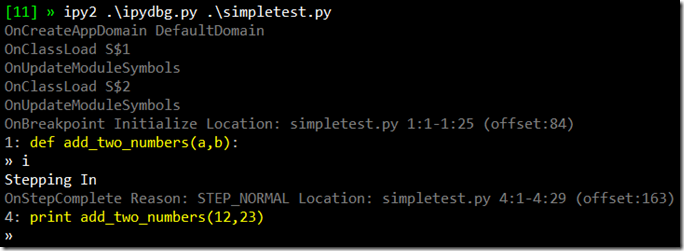
Now that I’ve added the current source code line to the console output, I wanted to start using color in order to make it clearer to understand the various pieces of data that gets output. Now, the various event handler messages get output in dark grey while the current line of source is in yellow. Here’s what it looks like on my machine (note, the top line with the green [11] is PowerShell and ipy2 is a PowerShell alias to ipy.exe v2.0.1)

ipydbg on the console

Writing color to the windows console is a hassle because of the stateful API it uses. The problem is that I always want to return to the default color after I’ve written out a line of colored text. I wish there was an overload of Console.Write and WriteLine that took the foreground and background colors as arguments.

Of course, I could easily implement my own write and writeline methods that took color parameters. However, I was loath to do that as Python’s print statement is so convenient. So instead, I build a console color context manager. I got the idea from Luis Fallas’ XmlWriter context manager.

class ConsoleColorMgr(object):  
  def __init__(self, color):  
    self.color = color  

  def __enter__(self):  
    self.temp = Console.ForegroundColor  
    Console.ForegroundColor = self.color  

  def __exit__(self, t, v, tr):  
    Console.ForegroundColor = self.temp  

CCDarkGray = ConsoleColorMgr(ConsoleColor.DarkGray)
CCGray     = ConsoleColorMgr(ConsoleColor.Gray)
CCYellow   = ConsoleColorMgr(ConsoleColor.Yellow)

def OnCreateAppDomain(self, sender,e):  
    with CCDarkGray:  
      print "OnCreateAppDomain", e.AppDomain.Name  
    e.AppDomain.Attach()

Python’s with statement is similar to C#’s using statement. However, unlike IDisposable object, Python context managers support both an enter and exit method. This means I don’t have to construct an object in order to get a context (in this case, the console colors) managed. So far, I’ve got three console color context managers defined – Grey, DarkGrey and Yellow. I’m thinking that ConsoleColorMgr is a candidate for my assorted module collection at some point.

Now that I can print in color, I wanted to modify my line printer to use color. Usually, the current sequence point corresponds to an entire line of python source. But as we see below, sometimes only part of a given line of source text is associated with a given sequence point.

The other issue I ran into is that there’s a always a sequence point at the very end of a function. Unlike the break at the start of the function I wrote about in my last post, this one I didn’t want to automatically step over. This is the last breakpoint for a given scope, so I should give the user one last chance to inspect the scope (once I add the ability to do that, at any rate) before we step out of it. However, I wanted a way of showing that we’re about to step out in the source code line view. I decided on writing a series of carets ^^^ to indicate that we’re at the end of a function.

As you can see in the dark grey line in the screenshot above, the current sequence point starts and ends at line 4 column 23. Column 23 is beyond the end of line 4, so that’s what I look for in order to draw the three carets. Here’s the final version of _print_source_line:

def _print_source_line(self, sp, lines):
  line = lines[sp.start_line-1]
  with CCGray:
    Console.Write("%d: " % sp.start_line)
    Console.Write(line.Substring(0, sp.start_col-1))
    with CCYellow:
      if sp.start_col > len(line):
        Console.Write(" ^^^")
      else:
        Console.Write(line.Substring(sp.start_col-1,
                                     sp.end_col - sp.start_col))
    Console.WriteLine(line.Substring(sp.end_col-1))

So colorizing the current line of source code turned out to be a little harder than I had expected. But hey, I got a start of a reusable module out of it. That’s pretty cool. Anyway, the latest bits are, as always, up on GitHub.

Writing an IronPython Debugger: A Little Hack…err…Cleanup

Yesterday, I pushed out two commits to ipydbg. The first was simple, I removed all of the embedded ConsoleColorMgr code in favor of the separate consolecolor.py module I blogged about Thursday. The second commit…well, let’s just say it’s not quite so simple.

Last weekend, I was experimenting with breakpoints when I discovered that the MoveNext method of BreakpointEnumerator was throwing a NotImplementedException. Up to that point, I hadn’t modified any of the MDbg C# source code except to merge the corapi and raw assemblies into a single assembly. But since I had to fix BreakpointEnumerator, I figured I should make some improvements to the C# code as well. For example, I added helper functions to easily retrieve the metadata for a class or function.

In my latest commit, I’ve added a SymbolReader property to CorModule. Previously, I managed the mapping from CorModules to SymbolReaders in my IPyDebugProcess class via the symbol_readers field. However, since mapping CorModules to SymbolReaders is something pretty much any debugger app would have to do, it made more sense to have that be a part of CorModule directly. So now, you can set and retrieve the SymbolReader directly on the module. Furthermore, I moved the logic to retrieve a SymbolReader from the IStream provided in the OnUpdateModuleSymbols event into the CorModule class as well.

I wouldn’t have bothered to blog this change at all, except that if you look at how the SymbolReader property is implemented under the hood, it’s not what you would expect. Instead of having SymbolReader as an instance variable on CorModule – as you might expect -CorModule has a static dictionary mapping CorModules to SymbolReaders. The instance SymbolReader property simply then access to the underlying static dictionary.

//code taken from CorModule class in CorModule.cs
private static Dictionary<CorModule, ISymbolReader> _symbolsMap = 
    new Dictionary<CorModule, ISymbolReader>();

public ISymbolReader SymbolReader
{
    get
    {
        if (_symbolsMap.ContainsKey(this))
            return _symbolsMap[this];
        else
            return null;
    }
    set
    {
        _symbolsMap[this] = value;
    }
}

Now obviously, this the way you typically implement properties. However, the problem is that there isn’t a 1-to-1 mapping between the underlying debugger COM object instances and the managed objects instances that wrap them. For example, if you look at the CorClass:Module property, it constructs a new managed wrapper for the COM interface it gets back from ICorDebugClass.GetModule. That means that I can’t store the symbol reader as an instance field in the managed wrapper since I probably will never see a given managed wrapper module instance ever again.

All of the debugger API wrapper classes including CorModule inherit from a class named WrapperBase which overrides Equals and GetHashCode. The overridden implementations defer to the wrapped COM interface, which means that two separate managed wrapper instances of the same COM interface will have the same hash code and will evaluate as equal. The upshot is that object uniqueness is determined by the wrapped COM object rather that the managed object instance itself.

Using a static dictionary to store a module instance property provides the necessary “it doesn’t matter what managed object instance you use as long as they all wrap the same COM object underneath” semantics. If I create multiple instances CorModule that all wrap the same underlying COM interface pointer, they’ll all share the same SymbolReader instance from the dictionary.

Yeah, it’s feels kinda hacky, but it works.

Writing an IronPython Debugger: Getting Local Variables

I just pushed out a new drop of ipydbg that includes the first cut of support for showing local variables. Getting the value for a local variable is actually pretty simple. The CorFrame object (which hangs off active_thread) includes a method to get a local variable by index as well getting a count of all local variables. The problem with these functions is that they don’t provide the name of the variable. For that, you’ve got to look in debug symbols.

From a CorFrame, you can retrieve the associated CorFunction. Since I added symbol reader support to CorModule, I added support for directly retrieving the ISymbolMethod for a CorFunction. From the method symbols, I can get the root lexical scope of the method. And from the symbol scope, I can get the locals. Scopes can be nested, so to get all the locals for a given function, you need to iterate thru all the child scopes as well.

So here’s my get_locals function:

def get_locals(frame, scope=None, offset=None, show_hidden=False):  
    #if the scope is unspecified, try and get it from the frame
    if scope == None:  
        symmethod = frame.Function.GetSymbolMethod()  
        if symmethod != None:  
            scope = symmethod.RootScope  
        #if scope still not available, yield the local variables
        #from the frame, with auto-gen'ed names (local_1, etc)
        else:  
          for i in range(frame.GetLocalVariablesCount()):  
            yield "local_%d" % i, frame.GetLocalVariable(i)  
          return  

    #if we have a scope, get the locals from the scope  
    #and their values from the frame
    for lv in scope.GetLocals():  
        #always skip $site locals - they are cached callsites and  
        #not relevant to the ironpython developer
        if lv.Name == "$site": continue  
        if not lv.Name.startswith("$") or show_hidden:  
          v = frame.GetLocalVariable(lv.AddressField1)  
          yield lv.Name, v  

    if offset == None: offset = frame.GetIP()[0]  

    #recusively call get_locals for all the child scopes
    for s in scope.GetChildren():  
      if s.StartOffset <= offset and s.EndOffset >= offset:  
        for ret in get_locals(frame, s, offset, show_hidden):  
          yield ret

The function is designed to automatically retrieve the scope and offset, if they’re available. That way, I can simply call get_locals with the frame argument and it does the right thing. For example, if you don’t pass in a symbol scope explicitly get_locals will attempt to retrieve the debug symbols. If debug symbols aren’t available, iterates over the locals in the frame and yields each with a fake name (local_0, local_1, etc). If the debug symbols are available, then it iterates over the locals in the scope, then calls itself for each of the child scopes (skipping child scopes who’s offset range doesn’t overlap with the current offset).

The other feature of get_locals is deciding which locals to include. As you might expect, IronPython emits some local variables that are for internal runtime use. These variables get prefixed with a dollar sign. The dollar sign is not a legal identifier character in C# or Python, but IL has no problem with it. If you pass in False for show_hidden (or use the default value), then get_locals skips over any local variables who’s name starts with the dollar sign.

Even if you pass in True for show_hidden, get_locals still skips over any variable named “$site”. $site variables are dynamic call site caches, a DLR feature that are used to efficiently dispatch dynamic calls by caching the results of previous invocations. Martin Maly’s blog has more details on these caches. As they are part of method dispatch, I never want to show them to the ipydbg user, so they get skipped regardless of the value of show_hidden.

Now that I can get the local variables for a given frame, we need to convert those variables to something you can print on the screen. That turns out to be more complicated that you might expect, so it’ll have to wait for the next post (which may be a while, given that PyCon is this weekend). In the meantime, you can get the latest version of ipydbg from GitHub.

Writing an IronPython Debugger: Displaying Values

Now that I can get the local variables for a given frame, I need to display them in the console. Eventually, I’d like to provide the ability to update the local variables as well, but you gotta crawl before you can run. Luckily, the debugger API is consistent about using same COM interfaces – wrapped by the managed CorValue class – to represent all data values, including local variables, function arguments and object fields. So the work I do now to display CorValues in the console will be reusable in other contexts down the road.

While the debugger API is consistent about how it represents values in the target process, the API it uses is very complicated. The primary COM interface for accessing values is ICorDebugValue, but it has eight siblings: ICorDebugReferenceValue, ICorDebugHandleValue, ICorDebugStringValue, ICorDebugObjectValue, ICorDebugGenericValue, ICorDebugBoxValue, ICorDebugArrayValue, ICorDebugHeapValue. All those COM interfaces are represented in managed code by CorValue and it’s subclasses.

Furthermore, confusingly ICorDebugValues have both a Type and an ExactType. ExactType is what .NET developers typically think of as the type, aka the CLR type. Well, the debugger API’s representation of the CLR type at any rate. You can retrieve the value’s metadata as a System.Type compatible object via value.ExactType.Class.GetTypeInfo().CorValue’s Type property, on the other hand, represents the object’s primitive or element type. For example, instances of .NET classes have an element Type of ELEMENT_TYPE_CLASS. There are a collection of primitive types (boolean, char, ints of various signage and size, floats of various size) as well as types you wouldn’t call primitive but that the runtime has specific knowledge of (string, array and value types – aka structs in C# terminology).

If you’re confused by all that, don’t worry so am I. Honestly, I’ve re-written this code several times, each time understanding the API just a bit better. Whatever the right way to use the interfaces, I’m sure I don’t know it. For my first cut at this, I essentially ported MDbg’s high level CorValue API – aka MDbgValue::InternalGetValue if you’re looking at the MDbg source code – over to Python. Along the way, I’ve improved on that code as I’ll describe below.

A given CorValue may be a primitive value like an int or it may be a reference to or a boxed version of some other CorValue object. So in order to print the CorValue, you have to go thru a series of attempts to dereference and unbox until you get to the “real” underlying CorValue object. From there, converting the value to a string I can print depends on the value’s element type. For primitive types like ints and floats, you can call CastToGenericValue to get a CorGenericValue “view” of the same CorValue object [1]. A CorGenericValue can read and write the raw bytes from memory in the target process of the value. The GetValue method reads the data from target process then does an unsafe cast to appropriate managed type. For example, an ELEMENT_TYPE_R4 CorValue gets cast into a System.Single. For CorValue strings, I call CastToStringValue and then access the String property. For classes, value types and objects, there’s no simple or standard approach to retrieving the data, so for now I return the result of calling CastToObjectValue. Eventually, I’ll want to provide a mechanism to read the specific fields of a class or value type.

Unfortunately, the mechanism above to read primitive types doesn’t work with IronPython. GetValue needs to know the correct element type in order to do the unsafe cast. For value types (aka any struct other than the basic primitives), GetValue will return a data as a byte array. The problem is that when you box a primitive, the original element types gets overwritten by ELEMENT_TYPE_VALUETYPE. You can’t get the original element type back, even after unboxing. So for boxed primitives, you can only retrieve the data as a raw byte array or as a CorObjectValue, neither of which is very useful.

Luckily, I was able to work around this. Under the hood, GetValue calls UnsafeGetValueAsType to do the actual work of reading the data from the target process and casting it to the right managed type. UnsafeGetValueAsType It accepts the an element type value as a method parameter. If your know the right element type value, you could call UnsafeGetValueAsType directly if instead of going thru GetValue. While boxing overwrites the original element type value, an unboxed CorValue still has the CLR type metadata available. So I was able to map CLR Types to element types (e.g. System.Single –> ELEMENT_TYPE_R4) in order to retrieve the underlying value of boxed primitive types.

_type_map = { 'System.Boolean': ELEMENT_TYPE_BOOLEAN,
  'System.SByte'  : ELEMENT_TYPE_I1, 'System.Byte'   : ELEMENT_TYPE_U1,
  'System.Int16'  : ELEMENT_TYPE_I2, 'System.UInt16' : ELEMENT_TYPE_U2,
  'System.Int32'  : ELEMENT_TYPE_I4, 'System.UInt32' : ELEMENT_TYPE_U4,
  'System.IntPtr' : ELEMENT_TYPE_I,  'System.UIntPtr': ELEMENT_TYPE_U,
  'System.Int64'  : ELEMENT_TYPE_I8, 'System.UInt64' : ELEMENT_TYPE_U8,
  'System.Single' : ELEMENT_TYPE_R4, 'System.Double' : ELEMENT_TYPE_R8,
  'System.Char'   : ELEMENT_TYPE_CHAR, }

_generic_element_types = _type_map.values()

class NullCorValue(object):
  def __init__(self, typename):
    self.typename = typename

def extract_value(value):
    rv = value.CastToReferenceValue()
    if rv != None:
      if rv.IsNull:
        typename = rv.ExactType.Class.GetTypeInfo().Name
        return NullCorValue(typename)
      return extract_value(rv.Dereference())
    bv = value.CastToBoxValue()
    if bv != None:
      return extract_value(bv.GetObject())

    if value.Type in _generic_element_types:
      return value.CastToGenericValue().GetValue()
    elif value.Type == ELEMENT_TYPE_STRING:
      return value.CastToStringValue().String
    elif value.Type == ELEMENT_TYPE_VALUETYPE:
      typename = value.ExactType.Class.GetTypeInfo().Name
      if typename in _type_map:
        gv = value.CastToGenericValue()
        return gv.UnsafeGetValueAsType(_type_map[typename])
      else:
        return value.CastToObjectValue()
    elif value.Type in [ELEMENT_TYPE_CLASS, ELEMENT_TYPE_OBJECT]:
      return value.CastToObjectValue()
    else:
      msg = "CorValue type %s not supported" % str(value.Type)
      raise (Exception, msg)

It’s kinda ugly code and I’m thinking that at least some of really belongs in the CorValue C# classes rather than in ipydbg. However, I’m not that interested in doing the significant refactoring it would take to make the CorValue API developer-friendly, so I did it here.

One thing to note that I didn’t cover earlier is the NullCorValue object. For reference values, there’s a IsNull property that may be set. If it is set, I need a mechanism to indicate the null value, but also includes the type information. So I created a custom type that can store the type name to represent null. Again, something that should be a part of the CorValue API.

Once I have my extracted value, I need to display it in the console. This is much simpler than the extracting the value. As I wrote above, I’m not making any attempt to print a real representation for CorObjectValues. I could look at making a call ToString call to get something useful, but that requires invoking a function in the target process and I haven’t gotten that far with ipydbg yet. So I just print “<…>” if it isn’t a string, primitive or null value.

def display_value(value):
  if type(value) == str:
    return (('"%s"' % value), 'System.String')
  elif type(value) == CorObjectValue:
    return ("<...>", value.ExactType.Class.GetTypeInfo().FullName)
  elif type(value) == NullCorValue:
    return ("<None>", value.typename)
  else:
    return (str(value), value.GetType().FullName)

Now all I need is to iterate thru the list of local variables and call extract_value and display_value on each in turn and print the results. I won’t reproduce that code here, but you can see it in the ipydbg project source on GitHub.

I’m happy with what I’ve gotten working (it took several days of banging my head against the proverbial wall to get it this far) but there’s still room for improvement. First, I’d like to be able to call ToString to get a class-specific generic representation as I described above. Second, I need a way to display the fields of a CorObejctValue object. It’s just a combination of metadata reading and CorObjectValue::GetFieldValue, but that code won’t write itself. Finally, there are other Python primitives – like list, dictionary and tuple – that ipydbg should have specific knowledge of and be able to display without requiring the user to drill into the member variables and the like.

  1. While the CorValue API does certain things very well, I wish it did a better job abstracting away the existence of the various ICorDebugValue interfaces. Hence the need for all the calls to CastToWhatever(). ↩︎

Writing an IronPython Debugger: Command Routing

At this point, ipydbg support seven commands: Continue, Quit, Show Stack Trace, Show Locals, Step Over, Step In, and Step Out. All these commands are invoked by a single keystroke. I’m using Console.ReadKey in an attempt to cut down on the number of keystrokes needed for interacting with the debugger. If I only type ‘s’ instead of ‘s <enter>’ to step, I figure I’ll be twice as productive! 😄

If I was writing ipydbg in C#, I could use switch statement to dispatch commands in the _input method based on user keystrokes. However, Python doesn’t have a switch statement so I’ve been using a cascading set of if/elif/else statements instead. When you get up to seven if/elif clauses plus an else clause, the code smell is pretty overwhelming.

# Only has three if/elif clauses,but it's already a little smelly
val = Console.ReadKey()
if val.Key == 'a':  
  result = 'a'  
elif val.Key == 'b'  
  result = 'b'  
elif val.Key == 'c'  
  result = 'c'  
else:  
  print "unknown key"

Python might not have a switch statement, but it does have first-order functions so you can get the effects of a switch by using a dictionary.

def do_a():
  return 'a'
def do_b():
  return 'b'
def do_c():
  return 'c'
_switch = {'a':do_a, 'b':do_b, 'c':do_c}

val = Console.ReadKey()
if val in _switch:
  result = _switch[val.Key]()
else:
  print "unknown key"

I like this approach much better. Individual if/elif blocks are now broken out into separate functions, which smells better than embedding them in one big function. Also, I like that my pseduo-switch statement is completely separate from the how the _switch dictionary is initialized. However, this approach also separates the pseudo-case statement functions from the _switch dictionary as well. That’s not a good thing. You can easily imagine screwing up by adding a new function but forgetting to manually update the _switch dictionary.

What I need is a way to declaratively associate the switch function with the dictionary lookup key that’s associated with it. Luckily, Python Decorators provides a very clean way to do this.

_switch = {}

@inputcmd(_switch, 'a')
def do_a():
  return 'a'
@inputcmd(_switch, 'b')
def do_b():
  return 'b'
@inputcmd(_switch, 'c')
def do_c():
  return 'c'

val = Console.ReadKey()
if val in _switch:  
  result = _switch[val.Key]()  
else:  
  print "unknown key"

I’ve blogged about decorators before when I wanted to automatically invoke operations on the right thread in my WPF photo viewing app. The @inputcmd decorator is a bit more complicated than the @BGThread and @UIThread decorators since @inputcmd decorator accepts arguments. Each of the @input command decorators in the code above is the equivalent to this code:

def do_a():
  return 'a'

_tmp = inputcmd(_switch, 'a')
do_a = _tmp(do_a)

As you can see, the inputcmd function returns the decorator that wraps do_a, rather than being the decorator itself. This function that returns a function that returns a function is kinda confusing at first. But this approach allows you to configure the decorator for a specific purpose via the arguments – in this case, specifying which dictionary and which console key this function is associated with.

Also unlike @BGThread and @UIThread, I don’t actually want to modify the behavior of the methods decorated with @inputcmd. I only want to store a reference to them in the passed in dictionary. So implementing this decorator is very easy:

def inputcmd(cmddict, key):
    def deco(f):
        cmddict[key] = f
        return f  
    return deco

The decorator simply inserts the function into the passed-in dictionary using the passed in key. It then returns the function as is, so it’s not really rebinding the symbol to a new method (technically, it’s rebinding the symbol to the same function it’s currently bound to). If I wanted also wrap the passed in function to provide additional functionality, I could do that with a second locally defined function inside the deco function.

The latest version of ipydbg as been refactored to use @inputcmd instead of set of a cascading if/elif statement blocks. Now that that’s done, I can start working on multi-key commands.

← All series

